Security

Security and the law: what the program does and how it works.

The extension and the program work locally, without sending any data to the vendor, apart from an optional update check that happens only when you click. We collect no information about users or how the product is used. There is no account to create, and the license is verified without an internet connection.

Last updated:

Mechanisms

Concrete mechanisms, not promises.

No telemetry, no account

The extension has only local permissions: settings storage, the side panel and the connection to the program, plus access to the chat pages it works on. The program contains no networking library at all. No telemetry, no online licensing and no "anonymous statistics". The only connection the extension makes to our website is the update check, and only after you click the button in the panel: it then fetches the updates.json file, with no version number or identifiers.

A separate map for each tab

The replacement map lives in the program's memory, not in the browser, so neither the chat page nor another extension can read it. The same person gets different replacements in two conversations, and one chat's page cannot restore data from another.

Nothing left after closing the tab

The map disappears with the tab. In case the connection drops, the program keeps an encrypted copy (key in Keychain on macOS, in Credential Manager on Windows, without passwords or API keys), deleted with the tab, when the browser restarts, and after 24 hours at the latest.

Chat files never touch the disk

A file from the chat is decoded, masked and sent back in memory. The program does not save a working copy, so a crash does not leave the original in a temporary folder.

Clipboard and files from the program menu

The clipboard shortcuts are off by default, and the clipboard is read only after you press a shortcut or pick a command in the menu. The clipboard replacement map lives only in the program's memory: it disappears after "New session", after 24 hours of inactivity and when the program closes. A file from the menu (a PDF too) gets a neutral name ending in _anon, the original stays unchanged, and the map is stored encrypted with a system key on your computer and deleted after 30 days. The system clipboard history and clipboard managers are outside our control and may keep the original that was copied before you used the shortcut.

A local audit log, without content

The program keeps an event log on your computer to help explain support requests: when it ran, the license state, how much data of which kind was masked and why a file was stopped. The log holds numbers and codes; it has no messages, detected values, names of people and companies, custom phrases or file names. Entries are linked by a hash chain and signed with a key from the system keychain, so an unnoticed change can be detected (dnf audit verify). The log is kept for 180 days, works with every license and is never sent anywhere.

Collision-free replacements

Before the first replacement, the program reserves all real values from the text and files, including those from other open tabs. No fictional "Nowak" will clash with the real Nowak in row 40.

A program only for this extension

The program accepts connections only from a single, fixed extension ID. Another extension cannot launch it, and the chat page has no access to it.

Digitally signed, and you can check it

The Windows installer and programs are signed with a certificate issued by Microsoft after verifying the company's identity, and the macOS installer with an Apple Developer ID and Apple notarization. Publisher: Sebastian Obara It&Consulting. Check it yourself: on Windows right-click the file → Properties → Digital Signatures, on macOS pkgutil --check-signature donotfeedai-macos.pkg.

Detection is rule-based and can miss something. It is a technical measure that supports GDPR and NIS 2 compliance, not compliance in itself.
What it detects

Rules and checksums, tuned for Polish data.

No language models and no cloud. Deterministic, in milliseconds, the same in the chat and in files.

  • First name and surnamealso in Polish inflected forms: "dla Magdaleny", "do Kowalskiego", and written in capital letters: "JAN KOWALSKI"
  • PESEL (national ID)valid checksum or a plausible date of birth
  • NIP, REGON, IBAN, ID card no., payment cardswith checksum validation, so an order number is not mistaken for a tax ID or a card
  • Phone and e-mailthe e-mail follows the person's pattern: s.obara@ becomes s.zalewski@
  • Address, postal code and city"ul. Długa 7" and "Skosna 8" next to other data
  • CompanySp. z o.o., S.A., Sp. j., Ltd., GmbH, also in capital letters
  • Custom phrasesnames of projects, clients, products
  • Spreadsheet columnsa header such as "Nazwisko" (surname) or "PESEL" sets the type of the whole column

For developers, admins and DevOps

Configs, logs and scripts without secrets and without your client's infrastructure names.

You paste a docker-compose.yml, part of a .env file or a production log. The program on your computer masks passwords, tokens and keys (over 220 provider formats: AWS, GitHub, GitLab, Slack, Stripe, OpenAI, PEM private keys, passwords in connection strings), hosts, IP addresses and logins. The structure stays, so the AI still understands what it is reading: db-prod-01.eu.acme.internal becomes db-prod-01.eu.zorin.internal, addresses from one subnet land in one fake subnet, an AKIA… key still looks like an AWS key, and the fixed file in the reply comes back with the real values. Passwords and keys live only in the program's memory and are never written to disk.

What it looks like

This is what it looks like in the chat.

A video and screenshots of the real extension: the icon menu before sending, a reply with the data restored, and the settings panel. Swipe or use the arrows to move between screenshots; click one to open it full size.

Video (29 s, no sound): you paste data, the icon counts it, the menu shows the replacements, and the reply comes back with your real data.
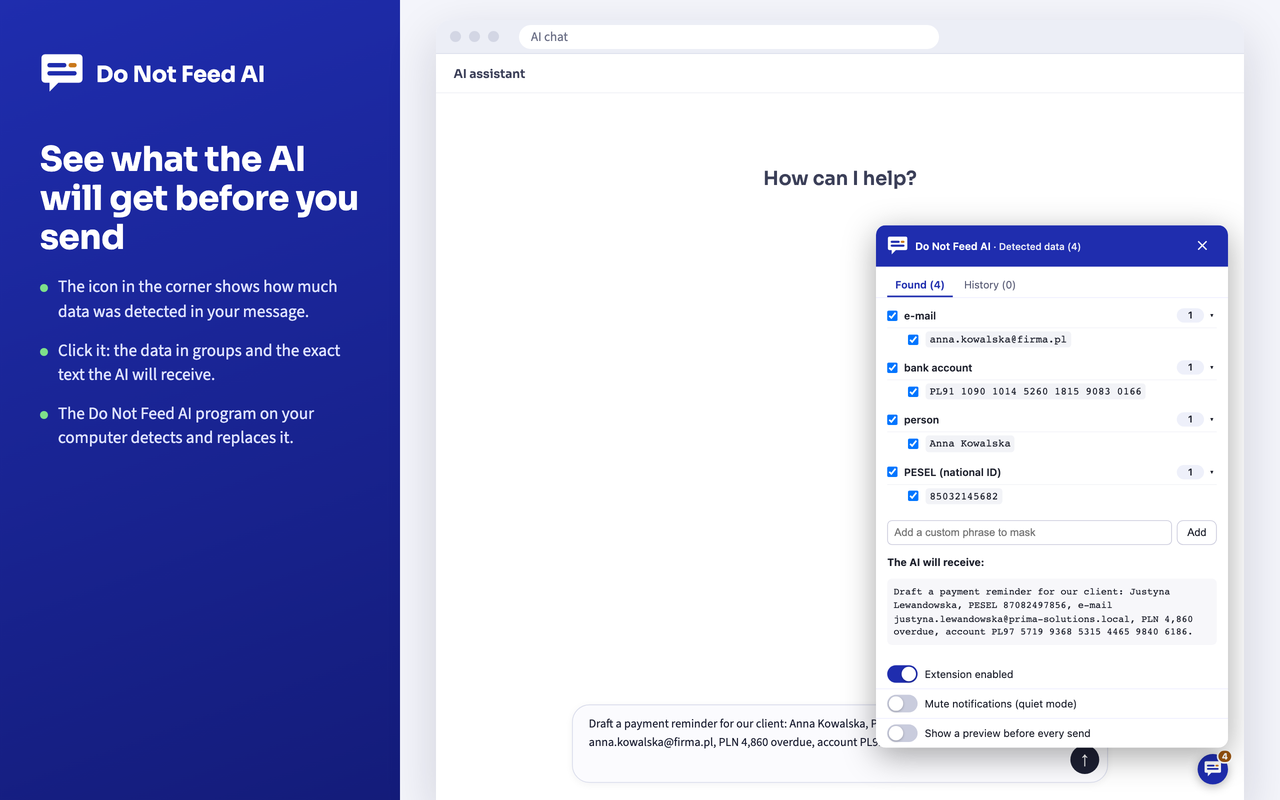
An AI chat page with the Do Not Feed AI icon menu open: detected data in groups (e-mail, bank account, person, PESEL national ID) with checkboxes, a field for a custom phrase and the text the AI will receive, already with fictional data.
Before sending: the icon in the corner counts the detected data, and its menu shows it in groups, along with the exact text the AI will get.
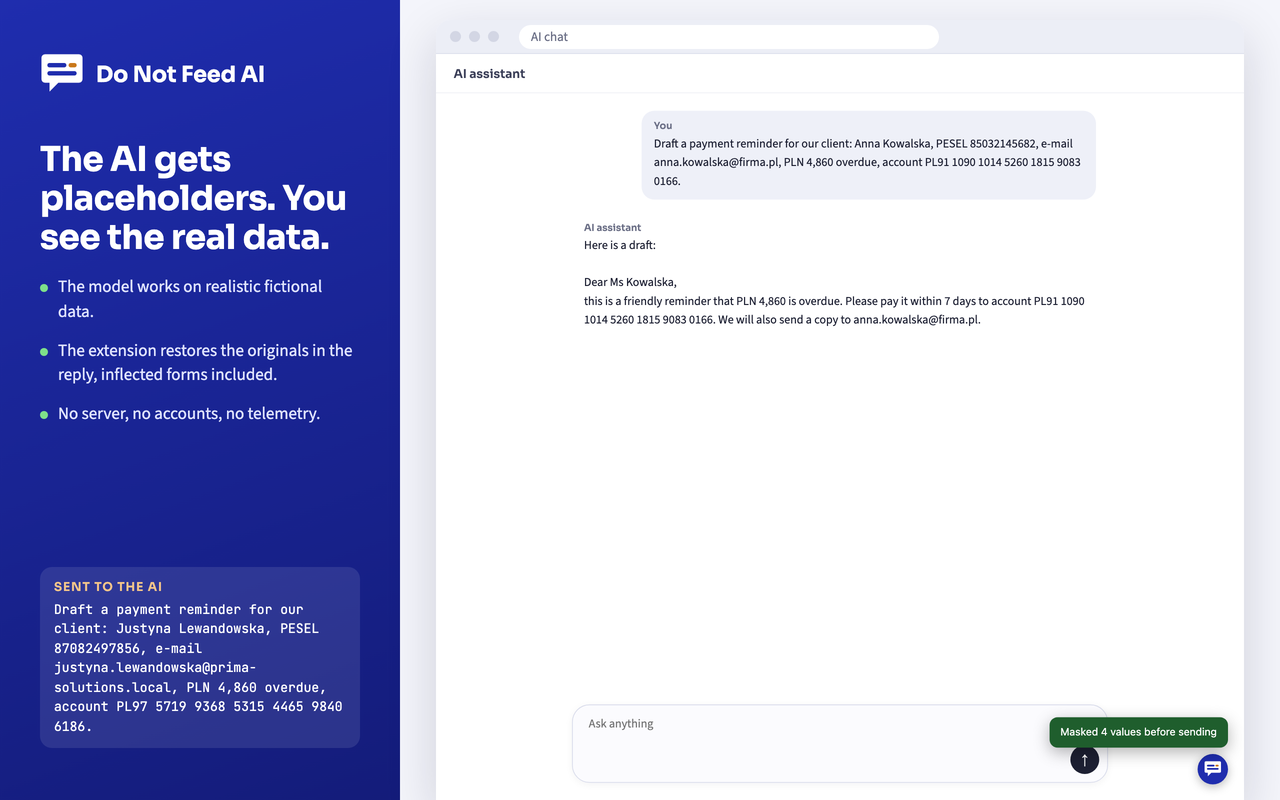
An AI chat conversation: the model's reply with the real name, bank account number and e-mail address restored; beside it, the text that actually reached the AI, with fictional data, and the notification "Masked 4 values before sending".
The reply: the AI worked on replacements, and the originals come back on your screen.
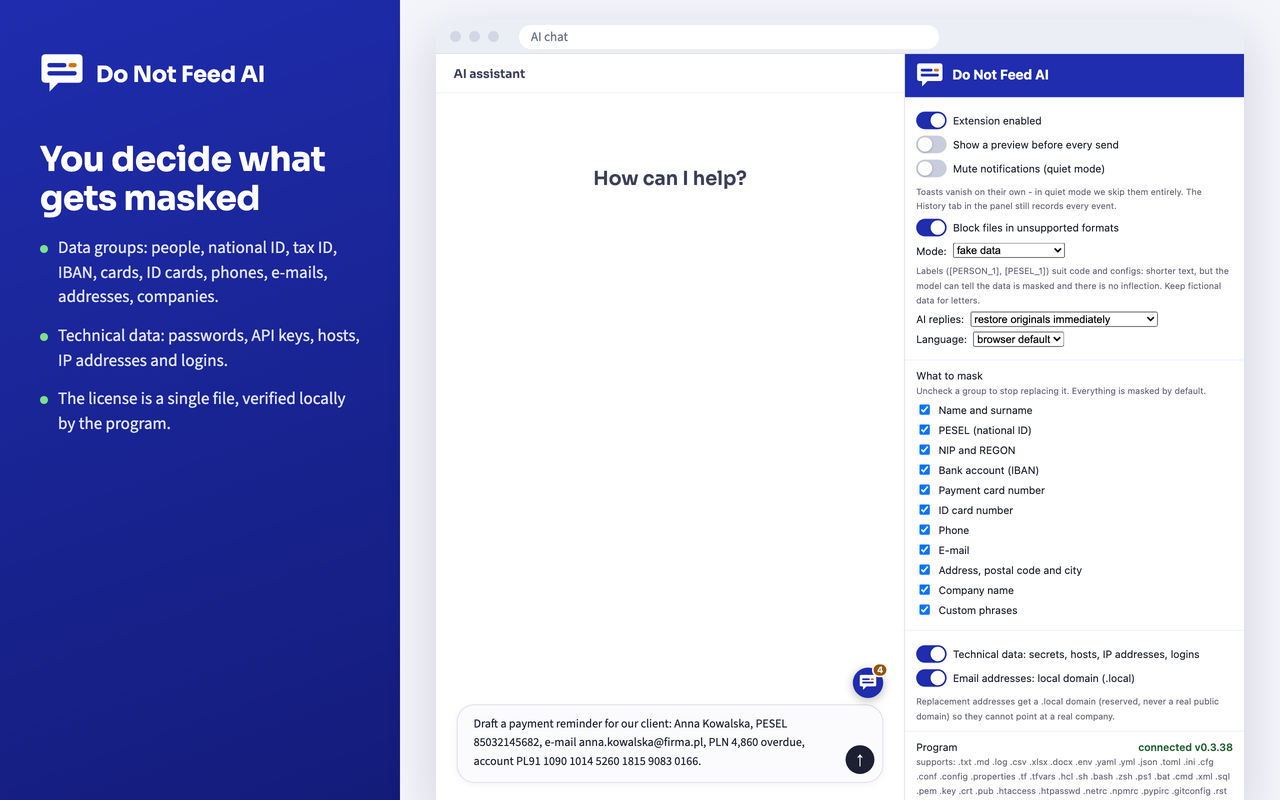
The extension settings panel next to the chat: toggles, fake data mode, how AI replies are restored, language, and the list of data groups to mask with checkboxes.
The extension panel: replacement mode, restoring replies, language and the data groups to mask.

GDPR and NIS 2

The law doesn't say "don't use AI". It says "pseudonymize and encrypt".

Quotes from the official texts, unabridged. With each one: what exactly the extension does about it. It is a technical measure that supports compliance, not compliance in itself; the data controller decides whether it is adequate.

GDPR · Art. 4(5)

'pseudonymisation' means the processing of personal data in such a manner that the personal data can no longer be attributed to a specific data subject without the use of additional information, provided that such additional information is kept separately and is subject to technical and organisational measures to ensure that the personal data are not attributed to an identified or identifiable natural person;

The extension: the chat receives replacements for the detected data, and the "additional information", meaning the replacement map, is kept separately, in the program on the user's computer, separately for each chat tab; its backup copy is encrypted with a key from the system keychain.

GDPR · Art. 5(1)(c)

adequate, relevant and limited to what is necessary in relation to the purposes for which they are processed ('data minimisation');

The extension: the model provider does not need a real national ID number (PESEL) or surname to write a letter. It gets the structure and content, with the detected identifiers replaced.

GDPR · Art. 5(1)(f)

processed in a manner that ensures appropriate security of the personal data, including protection against unauthorised or unlawful processing and against accidental loss, destruction or damage, using appropriate technical or organisational measures ('integrity and confidentiality').

The extension: masking happens before sending, automatically, in files too, so it limits the impact of accidentally pasting client data into a chat.

GDPR · Art. 25(1)

Taking into account the state of the art, the cost of implementation and the nature, scope, context and purposes of processing as well as the risks of varying likelihood and severity for rights and freedoms of natural persons posed by the processing, the controller shall, both at the time of the determination of the means for processing and at the time of the processing itself, implement appropriate technical and organisational measures, such as pseudonymisation, which are designed to implement data-protection principles, such as data minimisation, in an effective manner and to integrate the necessary safeguards into the processing in order to meet the requirements of this Regulation and protect the rights of data subjects.

The extension: pseudonymization built into the means of processing, not into the terms of use. The measure is deployed once, by policy, and works every time it is used.

GDPR · Art. 32(1)(a)

Taking into account the state of the art, the costs of implementation and the nature, scope, context and purposes of processing as well as the risk of varying likelihood and severity for the rights and freedoms of natural persons, the controller and the processor shall implement appropriate technical and organisational measures to ensure a level of security appropriate to the risk, including inter alia as appropriate: (a) the pseudonymisation and encryption of personal data;

The extension: both: pseudonymization of text and files, and encryption of the replacement map copy (XChaCha20-Poly1305), which disappears when the tab is closed.

GDPR · Art. 44

Any transfer of personal data which are undergoing processing or are intended for processing after transfer to a third country or to an international organisation shall take place only if, subject to the other provisions of this Regulation, the conditions laid down in this Chapter are complied with by the controller and processor, including for onward transfers of personal data from the third country or an international organisation to another third country or to another international organisation.

The extension: detected personal data is replaced before the message reaches the model provider, which narrows the data that the question of transfers outside the EEA applies to. Whether that is enough is for the data controller to assess.

NIS 2 · Art. 21(1)

Member States shall ensure that essential and important entities take appropriate and proportionate technical, operational and organisational measures to manage the risks posed to the security of network and information systems which those entities use for their operations or for the provision of their services, and to prevent or minimise the impact of incidents on recipients of their services and on other services.

The extension: a proportionate technical measure that reduces the risk of data and secrets leaking through public AI chats.

NIS 2 · Art. 21(2)(d), (g), (h), (i)

(d) supply chain security, including security-related aspects concerning the relationships between each entity and its direct suppliers or service providers; […] (g) basic cyber hygiene practices and cybersecurity training; (h) policies and procedures regarding the use of cryptography and, where appropriate, encryption; (i) human resources security, access control policies and asset management;

The extension: the AI provider is a service provider in the supply chain; the technical profile replaces detected passwords, keys and infrastructure names before sending, and the encryption of the replacement map and the program's lack of network connections can be written straight into the cryptography and cyber hygiene policies.

Sources: Regulation (EU) 2016/679 (GDPR), OJ L 119, 4.5.2016; Directive (EU) 2022/2555 (NIS 2), OJ L 333, 27.12.2022. Wording as in the English version; before using it in compliance documentation, check the current text in EUR-Lex.

For business

Deploy once, and it protects the whole team.

Your team keeps using ChatGPT, Claude or Copilot as before, and the AI receives replacements for the detected client data. The extension is in the Chrome Web Store, so in Chrome you roll it out to every workstation with a browser policy, and the program installs on Windows without administrator rights, and the license is one file for the whole organization. No accounts, no training. For compliance: a technical measure that supports GDPR and NIS 2 compliance and works automatically at the moment of sending.

Write to us - we will prepare an offer for your company.

ChromeEdge (Windows)Firefox·macOSWindows

What the deployment package includes

  • The program with pkg (macOS, signed and notarized) and exe (Windows, signed with a certificate issued by Microsoft) installers; on Windows also an MSI installer for IT departments (Group Policy, Intune, SCCM) and a silent install.
  • The extension from a company package under a fixed ID, and in Chrome also from the Chrome Web Store.
  • Custom phrases to mask for the whole company: names of clients, projects, products.
  • A description of the security mechanisms and architecture.